Improve performance with Service Worker
Caching is a key aspect of performance optimization in any application. The browser has a native cache for images, scripts, styles, fonts, and more. Like most caching, it helps most from the second interaction onward. Service workers and the Cache API let you precache assets during install, often in parallel with the page, so first time visitors can benefit too, especially for later requests on the same visit, not only on repeat loads.
Every browser ships with a cache for images, scripts, styles, fonts, and other static assets. That helps repeat visits feel fast, but on a first visit you still depend heavily on the network. Service workers and the Cache API offer more control: you can precache critical files during install, choose how requests are served, and keep users productive when the network is slow or unavailable.
Unlike the HTTP cache alone, you are not limited to helping only the next navigation. Once your page registers the worker, install and precache run on a separate thread in parallel with the UI. A first time visitor can still benefit on that same visit. Lazy loaded routes, images, or chunks requested after precache completes may load from cache. Return visitors get an even faster experience from a warm Cache Storage layer.
What is a service worker?
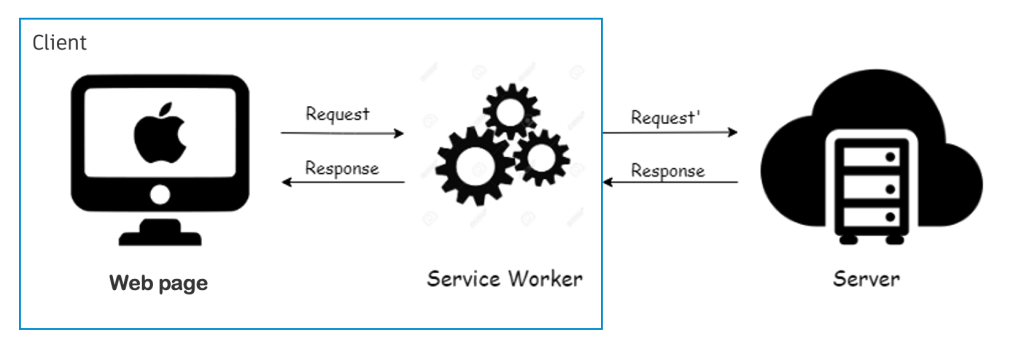
A service worker is a script that runs on its own thread, separate from your page’s main UI. It sits between your app and the network like a programmable proxy. That makes it a natural place to cache responses, handle push notifications, or serve an offline fallback page. Because it is not tied to a single tab, it can keep working in the background even after the user closes the browser, until the browser decides to stop it.
Lifecycle
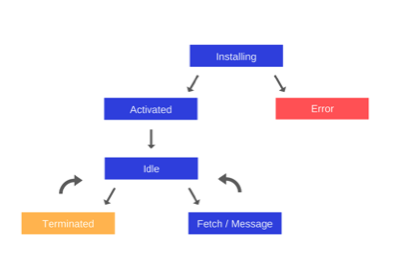
A service worker does not take control the moment you register it. It moves through install → waiting → activate, and only then can it intercept fetches for pages under its scope. Understanding that lifecycle matters when you ship updates: a new worker may sit in waiting until all tabs using the old one are closed.
Why cache with a service worker?
The browser already caches static assets, so why add another layer? In practice, service worker caching gives you control the HTTP cache alone does not.
Third party assets. You can cache CDN scripts and fonts on your terms. The browser cache often depends on headers set by someone else.
Precaching. Ship critical URLs at install time so return visitors, and later requests on the same session, get a warm Cache Storage layer, not only the HTTP cache.
Flexible strategies. Serve from cache, network, or both depending on the resource (see caching strategies below).
Micro frontends. Runtime chunks from other teams may not exist at build time. You can cache them as they are requested.
Weak networks. Offline or flaky connectivity is easier to handle when you control what is stored locally.
Long lived static chunks. Hashed build artifacts can stay in Cache Storage with explicit versioning and expiry.
Cache API and IndexedDB
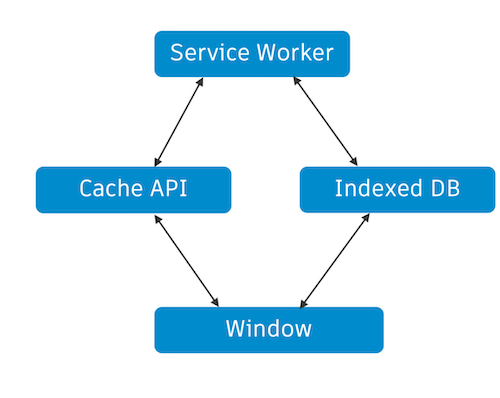
The Cache API stores pairs of Request and Response objects, exactly what you need when intercepting fetches. IndexedDB is a separate store for larger or structured data. Both are available in the window and in the service worker, which is why libraries like Workbox often use IndexedDB for metadata (for example, when an entry should expire) while keeping actual HTTP responses in Cache Storage.
Workbox
Workbox is Google’s library on top of the native service worker APIs. It does not replace the platform. It packages common patterns so you spend less time on boilerplate and edge cases.
You get sensible defaults for routing and caching strategies, expiration plugins backed by IndexedDB, cache versioning for precached assets, and tooling that makes debugging production caches less painful.
Precaching
Precaching means registering a list of URLs (a precache manifest, often with revision hashes) during the install event. The browser fetches those URLs and stores them in Cache Storage while install runs on the service worker thread, in parallel with whatever the page is still loading, once registration has started.
Workbox integrates cleanly with bundlers like webpack via plugins that generate the manifest from your build output.
First visit vs repeat visit
On a visitor’s first load of your origin, precaching does not help the earliest assets by default:
- The page loads HTML and starts fetching critical JS, CSS, and fonts from the network.
- Your app calls
navigator.serviceWorker.register(...). - The browser downloads the worker script and runs install, which triggers precache fetches.
So the main bundle and shell assets for that first navigation are often already in flight, or even finished, before install completes. Until the worker is active and controlling the client, fetch events for that document are not served from Cache Storage anyway. A new worker may also sit in waiting until tabs reload unless you use skipWaiting() and clients.claim().
That does not make precaching useless. It just means you should set expectations correctly.
Repeat visits. The worker is already installed and precached assets load from disk. This is where most of the performance gain shows up.
Same session, later assets. Lazy routes, images, or chunks requested after install finishes may hit precache if the worker controls the page by then.
Aggressive same tab setup. Early registration (for example in <head>), plus skipWaiting() and clients.claim(), can widen the window for same visit cache hits. Critical path resources on a true first visit are still a race with the network.
The separate worker thread avoids blocking the UI. It does not mean precache runs from the first millisecond of navigation.
Runtime caching
Not everything can be listed at build time, especially in a micro frontend setup where chunk URLs appear at runtime. Runtime caching fills the cache as users navigate: the first request may hit the network, later requests can be served from disk. That pattern is often a better fit for first visit wins on unknown URLs than precache alone. Workbox exposes the same strategy primitives for both precache and runtime routes.
Caching strategies
Workbox ships with named strategies you can compose or extend:
| Strategy | Behavior |
|---|---|
| Cache only | Always respond from cache; network is not used. |
| Network only | Always go to the network; nothing is read from cache. |
| Cache first | Try cache, fall back to network on miss. |
| Network first | Try network, fall back to cache on failure or timeout. |
| Stale while revalidate | Return cache immediately, update cache in the background. |
Pick a strategy per route. Shell and fonts might be cache first. API calls might be network first. Marketing images might use stale while revalidate.
Storage limits
Cache Storage is not unlimited. Browsers typically grant a share of available disk space (often discussed as a fraction of free space on the device). The exact quota is implementation defined and can vary. Safari on iOS has historically been stricter than desktop Chrome. When storage pressure grows, the browser may evict entries. Policies differ, but you should not assume your cache lives forever without a plan.
Cache invalidation
Shipping a new service worker is your main lever for invalidation: bump the precache manifest (or cache name) on each release so old entries are replaced. In production we usually:
- Version precached assets on every deploy.
- Keep the precache list small, only what the shell truly needs.
- Expire long lived static files on a schedule (for example, 30 days) where Workbox’s expiration plugin helps.
- Rely on the browser to purge under quota (often least recently used style behavior).
- Keep a kill switch, a way to skip the worker or clear caches if a bad deploy slips through.
Caveats
Service workers are powerful, but they come with constraints worth planning for:
- Updates are not instant. A new worker may stay in waiting until every tab using the old one is closed (unless you use
skipWaitingandclients.claimdeliberately). - HTTPS only. Service workers require a secure context (localhost is exempt for development).
- Opaque responses. Cross origin resources without CORS may cache poorly or not at all (
opaqueresponses have limited introspection). - No synchronous storage. The worker APIs are async;
localStorageand other sync APIs are unavailable in the worker context. - No Internet Explorer. Plan a graceful fallback for legacy browsers.
Further reading
- Service worker lifecycle: Google’s guide to install, activate, and update.
- Workbox strategies: Reference for each caching strategy.
- Precache with Workbox: Practical precaching walkthrough.
- Understanding service workers and caching strategies: Broader overview of patterns in the wild.